Photo Business
Activity Ledger

For the business behind your photography

Photo Business Activity Ledger

Why keep a ledger?

Running a photography business is two jobs. One is the work you love: the sessions, the light, the moment a client sees their photos. The other is everything around it. There are prep notes and editing queues, follow-ups and invoices, posts to plan and reviews to thank people for, receipts, mileage and license renewals. None of it is hard. It just adds up, and it’s scattered across your inbox, your phone, sticky notes and three or four apps that don’t talk to each other.

The Photo Business Activity Ledger brings that second job into one place. Open it in the morning and it tells you what needs you today: the session to prep for, the gallery that’s due, the client to follow up with, the invoice that’s late. It gets the words ready for you, from pitches and invoices to reminders and thank-you notes. It also keeps track of the dates, so you don’t have to hold them in your head.
Version 1.0 · November 2026Standalone or with ClaudeYour ledger is private to you

Why it makes sense to log it all

Your memory is busy. A record isn’t.

Most missed follow-ups and late galleries don’t happen because you didn’t care. They happen because the reminder lived only in your head. Once something is in the ledger with a date, it shows up on Today when it’s due.

What’s written down gets done.

A list of everyone to get back to is far easier to work through than a vague feeling that you’re forgetting someone.

Patterns only show up over time.

One week of notes tells you little. A few months tells you which posts bring inquiries, which ads actually book sessions, which months run slow, and what your real profit is after expenses and mileage.

It protects your money.

You always know what’s quoted, what you’re owed and what’s been paid. Licenses that are about to expire come up for renewal, and your expenses and mileage are ready at tax time instead of rebuilt from memory.

Clients feel the difference.

Galleries arrive on time, follow-ups happen when you said they would, and every review gets a thank-you. That’s what keeps a small studio’s reputation strong and the referrals coming.

It gives you your head back.

When the details live in the ledger, you can stop carrying them around and give that attention to your clients and your camera.

Logging takes a few minutes a day: a session when you book it, an expense when you pay it, a tick when you’re done. The value grows the longer you keep it. The best time to start is with your next booking.

The whole working week

More than a list of shoots.

Know what needs you today

Today · Follow-up · Calendar

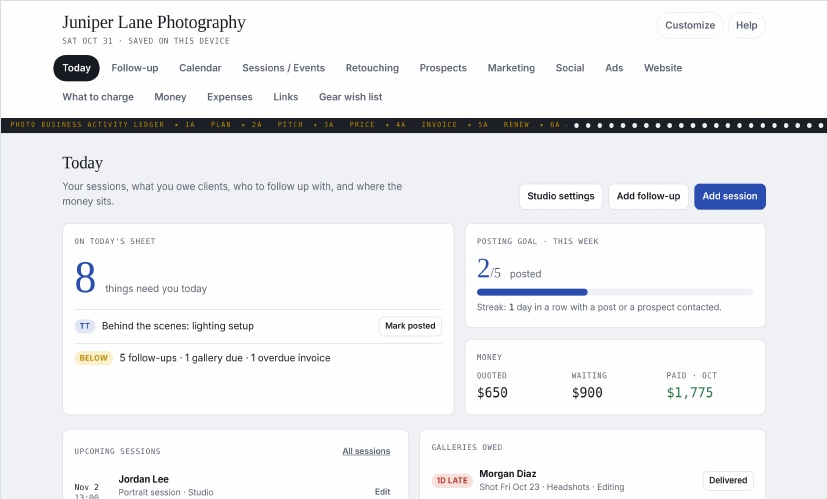
Sessions coming up, galleries owed, invoices waiting and people to follow up with. Due dates bring the next action to Today.

From booking to delivery

Sessions / Events · Retouching

Keep package details and prep notes with each session. Move editing jobs along and mark the gallery delivered.

Keep the money in view

What to charge · Money · Expenses

Plan quotes, track invoices and license renewals, and record expenses and mileage. Export expenses for your accountant.

Make room for the next booking

Prospects · Marketing · Social · Ads · Website

Keep prospects, seasonal plans, posts, ad results and website checks together. Prepare messages, then send them from your own accounts.

Your own colorsReorder or hide tabsAdd your own tabsExport and import backups

A look at your day

Less juggling. A clearer Today.

Open Claude sample
The actual Today tab showing Juniper Lane Photography, with follow-ups, money totals, upcoming sessions and galleries owed

Juniper Lane Photography is the made-up sample studio in your welcome guide. The Claude sample requires sign-in to Claude.

Photo Business Activity Ledger

One ledger for the business behind your photography — with the sample studio Juniper Lane Photography to show you the way.

Start with the welcome guide

Get to know your ledger.

A friendly tour of every tab. Start with Today, Sessions / Events and Money, and add the rest as you go.

Read the welcome guide

Two ways to use it

Same ledger. Your choice.

Both editions include the welcome guide and full user guide.

VERSION 1 · ZIP PACKAGE

Standalone

A file that stays with you.

  • Open the HTML file in your web browser
  • Works offline, no account needed
  • Saves in that browser on that device
  • Blank ledger + separate sample ledger
  • Move your data with backup export and import

Paid download

VERSION 1 · ZIP PACKAGE

With Claude

Your ledger, with Claude.

  • Open the shared link and sign in to Claude
  • Account sync requires ‘can use’ access
  • Use your ledger across your devices
  • Automatic updates · internet required
  • Getting-started links + both PDF guides

Paid download

Have a complimentary code? Apply it at checkout.

Questions?

Not sure which edition fits, or how the ledger works with your business? Contact me and I’ll help you sort it out.

Contact me