Photo Business
Activity Ledger

Photo Business Activity Ledger

CRM Interface

The ledger can’t plug into a CRM directly, because it has no server for other apps to send data to. What it can do is meet a CRM through a calendar and a spreadsheet. That gives you four possible ways to connect it.

These are proposed workflows, not connected features in the current downloads. Calendar access, spreadsheet tools and live CRM connections would need to be added and tested before use. Availability also depends on your CRM, plan and account permissions.

Your CRMGoogle CalendarYour ledger

The ledger comes in two editions — Standalone and With Claude — and each connection method below says which edition it works in. See the two editions

Four ways to connect the work

1. Through your calendar

Best for bookings

Many CRMs sync bookings to Google Calendar. The supplied workflow uses 17hats, with Google Calendar or Apple Calendar, as an example: your CRM, then your calendar, then the ledger.

With Claude: A proposed Import from calendar button could list upcoming bookings and turn a selected booking into a Session. It would read your calendar with your permission, without changing anything in the CRM. A supported calendar connection would be required.

Standalone: The file can’t read a calendar live. Proposed Add to calendar buttons could instead put sessions, retouching due dates and time blocks onto Google, Apple or Outlook calendars.

2. Spreadsheet in

For CRMs with CSV export

Export contacts or leads from your CRM as a CSV spreadsheet. For 17hats, the supplied instructions are to go to Contacts or Leads, click the gear icon and choose Export Contacts. You can filter by type or tag first.

A proposed Import spreadsheet button would read the file, let you match its columns—name, email, business and date—to the ledger’s fields, and add the rows as Prospects or Sessions. It would skip anyone already in the ledger.

3. Spreadsheet out

From the ledger to your CRM

When a prospect books, a proposed spreadsheet export would let you take their details from the ledger and import them into a CRM that accepts CSV contacts, such as 17hats. That way you wouldn’t need to retype a client.

4. A live connection

For CRMs with a supported Claude connector

The supplied proposal names HubSpot, Zoho CRM, Bigin and Nutshell as possibilities. Where a supported connector is available, the Claude edition could pull contacts and deals in directly. Current support and permissions would need to be confirmed.

The proposal notes that 17hats doesn’t have a Claude connector, and that its Zapier integration covers contacts on the newer 17hats Subscription plan. Copying new contacts into a Google Sheet for later import would be a workaround, not a direct link; plan requirements should be checked with 17hats.

A closer look at 17hats

The workflows above use 17hats as the example CRM, so here is what 17hats says about itself — taken from its own integrations page and help center articles. 17hats can change any of this, so check with 17hats before relying on it.

What 17hats connects to

17hats' integrations page lists Google Calendars and Apple Calendars (two-way calendar sync), Zoom (meeting links for booked meetings), money connections (17hats Payments, Stripe, QuickBooks Online and Bank Connect), photography order imports (ShootProof, Fundy, ProSelect, N-Vu), lead sources (The Knot, WeddingWire, Disruptor Marketing), two-way email sync, and Zapier.

The ledger isn't on that list — 17hats has no direct connection to it. What the proposed workflows build on are the parts 17hats does offer: its two-way calendar sync and the contact export described below.

The Zapier integration

17hats' help center says the Zapier integration is limited to contacts: importing, updating and syncing contacts two-way, which it notes is especially useful with email marketing tools. It's only available on the new 17hats Subscription plan — legacy "Essentials"/"Level 1" or "Standard"/"Level 2" plans must upgrade first.

To turn it on: Account Settings, Integrations, click Enable on the Zapier section and copy the API key it shows. You'll paste that key into Zapier the first time you connect 17hats, then build and test your Zap.

Because it moves contacts only, a Zap could copy new 17hats contacts into a Google Sheet for later import into the ledger — a workaround, not a direct link. Bookings, invoices and other 17hats items aren't covered by the current Zapier actions.

How to export your contact list

17hats sorts everyone you communicate with into four contact types: Hot Leads, Clients, Cold Prospects and Other. Its help center describes two ways to get contacts out: a CSV export or the Zapier integration.

For the CSV, go to your Contacts or Leads page, click the gear icon at the top right and choose Export Contacts — the file downloads automatically and can be uploaded to Google Sheets, Excel or any other spreadsheet program. Use the filter options or the tag search bar first to export just one type or tag. Only contact details are included: project documents, emails and time logs must be saved individually.

That CSV is exactly what the proposed Import spreadsheet step would read — export from 17hats, match the columns in the ledger, and your people arrive without retyping.

Details above come from 17hats' own pages: 17hats.com/integrations and the 17hats Help Center articles on the Zapier integration and exporting your contact list.

Other CRM connections

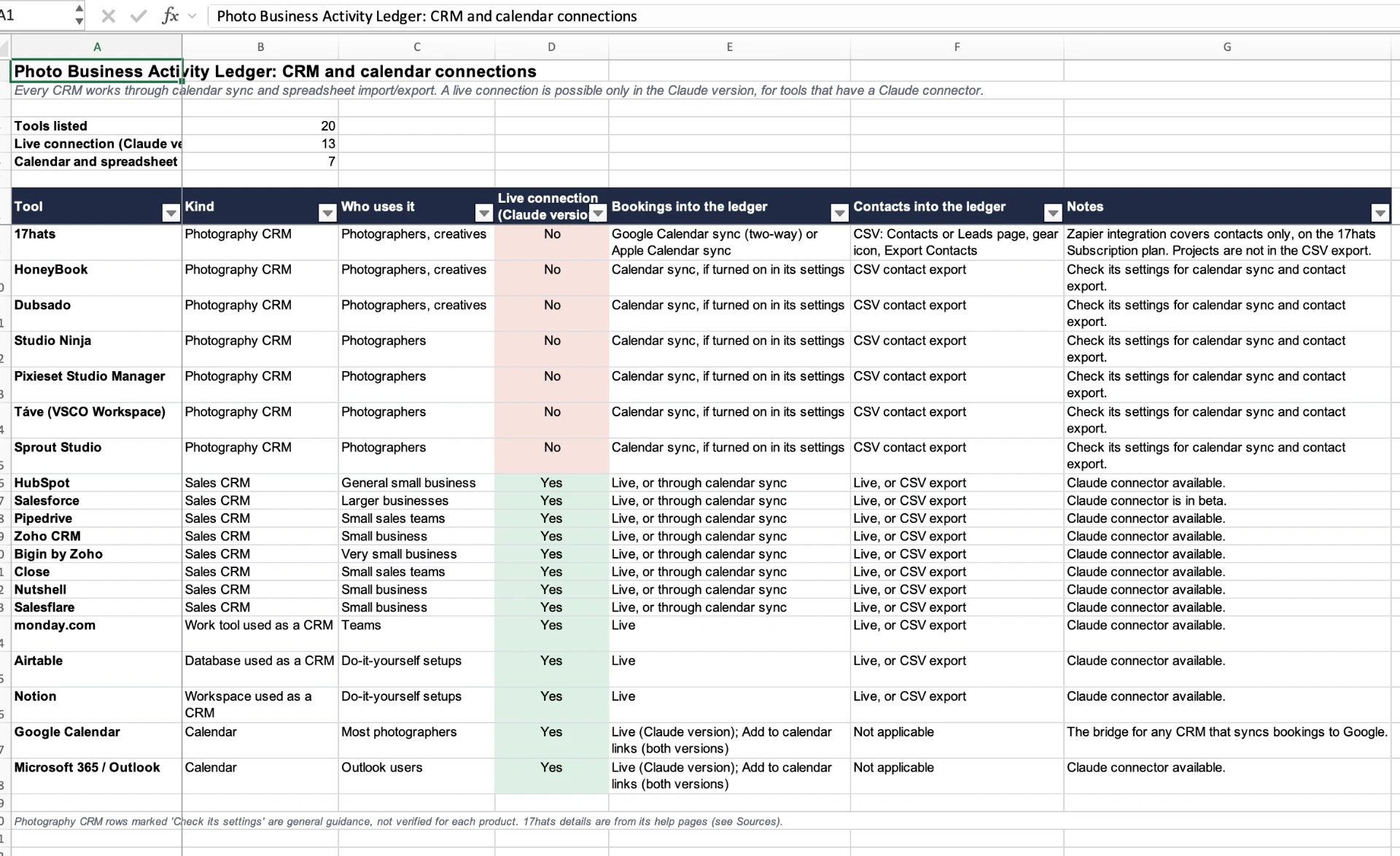
Every CRM can work through calendar sync and spreadsheet import or export. A live connection is possible only in the Claude version, for tools that have a Claude connector. Of the 20 tools below, 13 can connect live and 7 work through calendar and spreadsheet.

Screenshot of the CRM Connections spreadsheet: 20 tools listed, each with its kind, who uses it, whether it connects live in the Claude version, how bookings and contacts get into the ledger, and notes.
The CRM Connections spreadsheet, as set up. The Yes and No column shows which tools can connect live in the Claude version.
ToolKindWho uses itLive (Claude version)Bookings into the ledgerContacts into the ledgerNotes
17hatsPhotography CRMPhotographers, creativesNoGoogle Calendar sync (two-way) or Apple Calendar syncCSV: Contacts or Leads page, gear icon, Export ContactsZapier integration covers contacts only, on the 17hats Subscription plan. Projects are not in the CSV export.
HoneyBookPhotography CRMPhotographers, creativesNoCalendar sync, if turned on in its settingsCSV contact exportCheck its settings for calendar sync and contact export.
DubsadoPhotography CRMPhotographers, creativesNoCalendar sync, if turned on in its settingsCSV contact exportCheck its settings for calendar sync and contact export.
Studio NinjaPhotography CRMPhotographersNoCalendar sync, if turned on in its settingsCSV contact exportCheck its settings for calendar sync and contact export.
Pixieset Studio ManagerPhotography CRMPhotographersNoCalendar sync, if turned on in its settingsCSV contact exportCheck its settings for calendar sync and contact export.
Táve (VSCO Workspace)Photography CRMPhotographersNoCalendar sync, if turned on in its settingsCSV contact exportCheck its settings for calendar sync and contact export.
Sprout StudioPhotography CRMPhotographersNoCalendar sync, if turned on in its settingsCSV contact exportCheck its settings for calendar sync and contact export.
HubSpotSales CRMGeneral small businessYesLive, or through calendar syncLive, or CSV exportClaude connector available.
SalesforceSales CRMLarger businessesYesLive, or through calendar syncLive, or CSV exportClaude connector is in beta.
PipedriveSales CRMSmall sales teamsYesLive, or through calendar syncLive, or CSV exportClaude connector available.
Zoho CRMSales CRMSmall businessYesLive, or through calendar syncLive, or CSV exportClaude connector available.
Bigin by ZohoSales CRMVery small businessYesLive, or through calendar syncLive, or CSV exportClaude connector available.
CloseSales CRMSmall sales teamsYesLive, or through calendar syncLive, or CSV exportClaude connector available.
NutshellSales CRMSmall businessYesLive, or through calendar syncLive, or CSV exportClaude connector available.
SalesflareSales CRMSmall businessYesLive, or through calendar syncLive, or CSV exportClaude connector available.
monday.comWork tool used as a CRMTeamsYesLiveLive, or CSV exportClaude connector available.
AirtableDatabase used as a CRMDo-it-yourself setupsYesLiveLive, or CSV exportClaude connector available.
NotionWorkspace used as a CRMDo-it-yourself setupsYesLiveLive, or CSV exportClaude connector available.
Google CalendarCalendarMost photographersYesLive (Claude version); Add to calendar links (both versions)Not applicableThe bridge for any CRM that syncs bookings to Google.
Microsoft 365 / OutlookCalendarOutlook usersYesLive (Claude version); Add to calendar links (both versions)Not applicableClaude connector available.

Photography CRM rows marked “Check its settings” are general guidance, not verified for each product. 17hats details are from its help pages.

Ways to connect

Calendar sync

CRM to ledger · Claude version (live); both versions (Add to calendar)

Turn on your CRM's Google or Apple calendar sync. In the Claude version, use Import from calendar to turn bookings into Sessions.

Best for: Bookings and session dates

Spreadsheet import

CRM to ledger · Both versions

Export contacts or leads from your CRM as a CSV, then use Import spreadsheet in the ledger and match the columns.

Best for: Contacts, leads and prospects

Spreadsheet export

Ledger to CRM · Both versions

Export prospects or sessions from the ledger as a CSV, then import that file into your CRM.

Best for: Moving new clients into the CRM

Live connector

Both ways · Claude version only

Connect the CRM to your Claude account; the ledger reads contacts and deals with your permission.

Best for: CRMs in the table marked Yes

Zapier

CRM to a spreadsheet · Workaround

Have Zapier copy new CRM contacts into a Google Sheet, then download it as CSV and import it.

Best for: CRMs with Zapier but no Claude connector

Import spreadsheet, Export spreadsheet, Import from calendar and Add to calendar are proposed ledger features, not yet built.

Sources

Download the CRM Connections spreadsheet

How to divide the work

Your CRM: the official record

Keep bookings, contracts and payments in your CRM.

Your ledger: everything around it

Use the ledger for prep, retouching, follow-ups, marketing, expenses and profit. The proposed calendar and spreadsheet workflows would bring clients in without typing everything twice.

The proposed starting point

  • Import spreadsheet: Column matching for Prospects and Sessions, in both editions, for CRMs that export CSV files.
  • Export spreadsheet: Prospects and Sessions ready for importing into your CRM.
  • Calendar: Add to calendar buttons in both editions, with Google Calendar import proposed for the Claude edition.

Zooms & Training time blocks could be included as part of the proposed calendar work.

Explore the ledger

Questions?

Not sure whether your CRM can work with the ledger? Contact me and I’ll help you sort it out.

Contact me